
 LIVE GAMES
Stop game for TikTok LIVEThe Stop game you know, in your LIVE chat.
A letter is drawn, 8 categories show up and your viewers race to comment words. A word nobody else wrote is worth more, and whoever fills the last box calls STOP. Gifts become powers, Rubi runs the round and all you do is open the app and click Start round.

What viewers see on the LIVE
Live Stop screen, with demo names. See what each part shows.
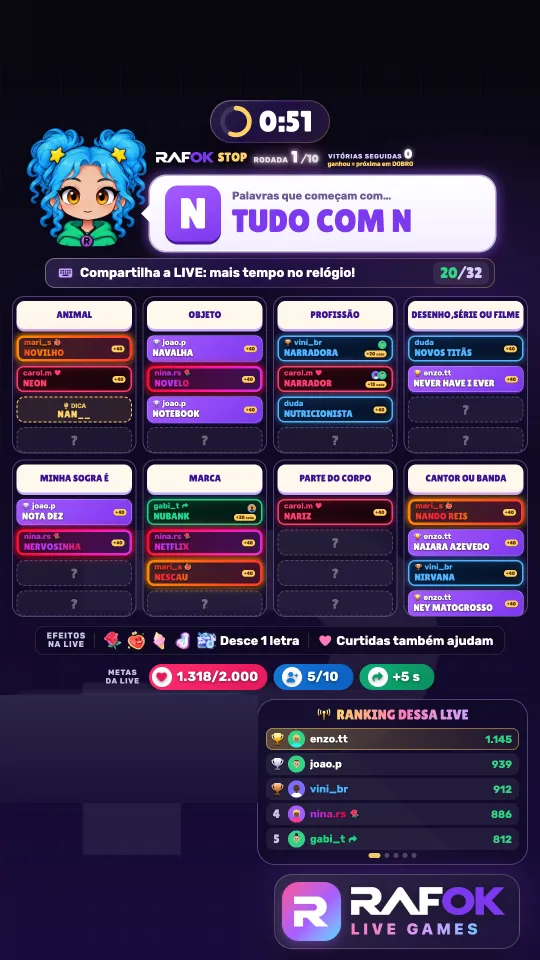
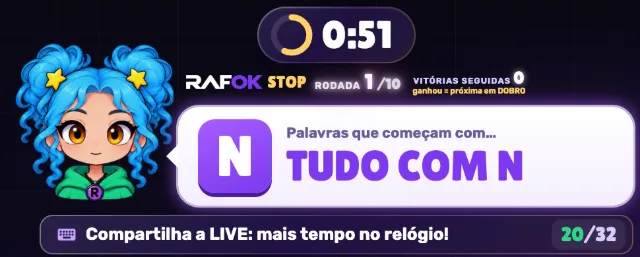
Letter and categories
A letter is drawn and the chat writes words starting with it in the 8 categories of the round. Timer and round stay at the top.
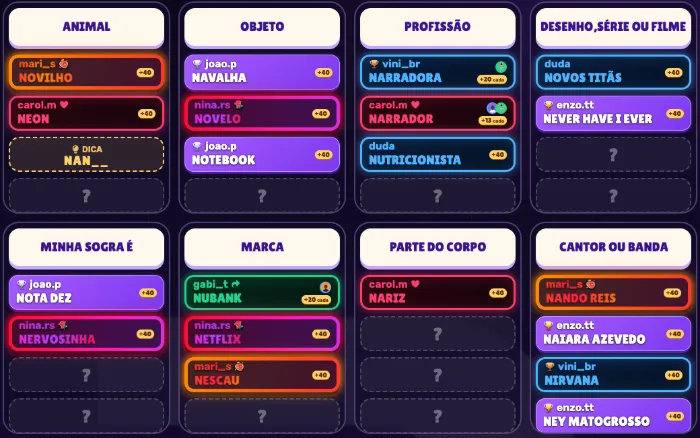
Boxes and nicks
The answer goes into the category with the nick of who wrote it and the points. A box with "?" is still open and the HINT shows the start of a word. The color shows how the person takes part in the LIVE, with the reason icon next to it:
- gift gradient of the most expensive gift the person sent, with its icon
- shared who shared the LIVE the most (arrow)
- liked who liked the LIVE the most (heart)
- follower follows the profile (no icon)
- nick no highlight yet (no icon)
The gold, silver or bronze trophy before the nick marks the LIVE top 3. The color does not change points: everyone scores the same.

LIVE goals
Likes, followers and shares fill the goals. A reached goal makes the next round worth more for everyone, and sharing adds seconds to the timer. In "Effects on the LIVE": Rose, Heart Me, Ice Cream, TikTok and Universe drop 1 letter.
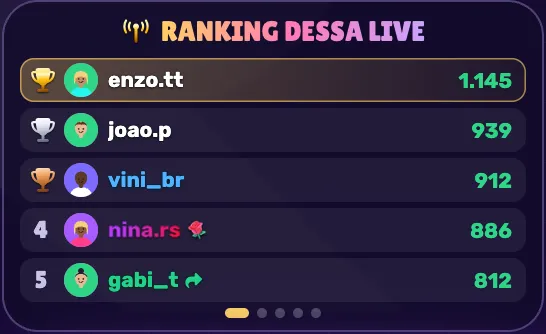
This LIVE ranking
LIVE top 5, with gold, silver and bronze trophies. The panel switches on its own between the LIVE, the interaction top, the day, the week and the season.
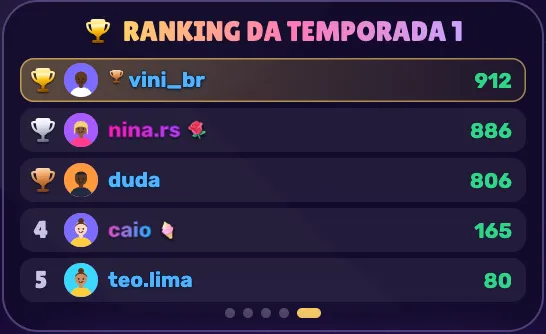
Season 1
From 11/09, whoever follows the profile has their points saved in the Season 1 Ranking: the rank carries over from one LIVE to the next.

One letter, 8 categories, the whole chat playing
Everyone has played Stop on paper. On your LIVE, the game checks the words and counts the points on its own.
- The wheel draws the letterAnd 8 categories out of 20, never two similar ones in the same round.
- The chat comments wordsEach word lands in the right category on its own, with the name of whoever wrote it.
- Last box calls STOPWhoever fills the last box gets +240 and the round closes with the scoreboard.
- Gifts become powersHints, extra time, a shield, a chosen letter and a round worth 10x.
Made to keep viewers hooked and your LIVE buzzing
Only correct words count
Each category has a word bank. Wrong words, made-up words and swear words don’t get in.
Fair ties
Wrote it alone? You get 160. Same word within 5 seconds? The points are split.
Gifts reveal a letter
Rose, Heart Me, Ice Cream Cone, TikTok and TikTok Universe reveal a letter for everyone, and points are the same for everyone. See them all on the gifts page.
Top supporters on screen
Top supporters show up with their photo on the stepped podium, on the STOP screen, in Royalty and on the scoreboard, and every gift changes the nickname on the scoreboard.
Goals on screen
Likes, followers and shares bars with big icons and numbers. The likes goal always stays ahead of the total, with a bonus every 5 minutes.
You run it from the app
Start the game, send a message to the screen, give everyone points (with the “+N points for everyone” banner), pick the letter and make the round worth up to 10x. All in a single window.
More ways for chat to join in
For both Puxa Palavra and Stop. No need to download it again: when a new version comes out, just tap the green Update button in the app.
Gifts and follows reveal a letter
Rose, Heart Me, Ice Cream Cone, TikTok and TikTok Universe reveal a letter, and so does every new follower (once per person). The last letter is never revealed. Sharing adds time to the round for everyone.
Rounds worth up to 10x
Every likes or followers goal reached adds +1x to the next round, for everyone: 2x, 3x and so on, up to 10x, with an animated intro. Goal progress and the “Effects on the LIVE” panel stay on screen.
Every player with their own style
Gifters get that gift’s gradient, the top sharer turns green, the top liker turns red and followers turn blue, with an icon next to the nickname and a ring around the photo. Players who get the same word right just after show up in “Also got it”.
LIVE ranking and trophies
List ranking by round, game, week and all time. The LIVE’s top 3 get gold, silver and bronze trophies, and “Today’s Royalty” thanks the day’s top supporters.
A more exciting end of round
The full board stays on screen for 2 seconds, followed by “STOP!” on a red stop sign that shows who called STOP. Then comes the new scoreboard, with a podium for the round’s top 3 and the 6 highest scorers of the LIVE.
The host talks more
70 new lines for each host, one at a time, never overlapping. She thanks followers and gifters by name when the name has a voice. In the app, the Follow, Direct and Give a hint buttons show the alert on screen with one of her lines.
Quick rounds that make you want to play again
20 categories in the game
Each round draws 8 that have words with that letter. Similar categories, like Fruit and Food, never come up together.
- Name
- Animal
- Fruit
- Object
- Place (country, state or city)
- Job
- Cartoon, series or movie
- My mother-in-law is
- Food
- Color
- Brand
- Body part
- Clothing or accessory
- Singer or band
- Sweet
- Drink
- Sport
- Vegetable
- Flower or plant
- Musical instrument
On a computer or on your phone
The RAFOK app runs on your computer, alongside the LIVE program you already use. On your phone, the game opens right in the browser.
On Windows
Install the app, pick Live Stop and add the game screen to TikTok LIVE Studio or OBS. The screen already comes upright, in the LIVE format.
On Mac
The same way: the RAFOK app with TikTok LIVE Studio or OBS on your MacBook or iMac. See the step by step.
On your phone
iPhone or Android, right in the browser: you save 2 icons on your home screen and go LIVE from the TikTok app, broadcasting your screen. See how.
Rubi runs every round
Intense and competitive, Rubi is the face of Stop. She calls the chat to play, celebrates every STOP, warns when time is running out and thanks every gift. Her mouth moves with her voice.
In the app you choose who hosts: Rafok is free, and Rubi and the other characters are in the character store.
Everyone gets it in 5 seconds
Small LIVEs can play too
With just a few people, each one takes the full 160 points. With lots of people, ties make the race tighter.
Every round is different
A new letter, 8 new categories, and a letter that was drawn only comes back once all of them have been drawn.
Less than R$ 1.70 a day
The monthly plan costs less than a coffee a day, with everything unlocked. The yearly plan is even cheaper.
- We never ask for your TikTok login or password
- No contract
- Free app to download
- Pix or card, unlocked right away
- Ticket support in your account

Bring the most competitive Stop on TikTok to your next LIVE
Everything unlocked, from R$ 129.90 down to R$ 49.90 a month or R$ 449.90 a year, no contract. Subscribe, download the app and follow the step by step.
or get ALL the games for R$ 99.90/mo
was R$ 149.70 · every RAFOK game
- This game and all the others
- New and seasonal games at no extra cost
- Every character with Prime Star
Install the app on your computer or open Rafok Painel on your phone, log in with your account and control the real game: the bots comment, answer and send pretend gifts, just like it looks on your LIVE. Free for 72 h, no card.
Demo with bots (not real people), with TikTok turned off. Download the free demoDesigned around TikTok's rules
A game that talks with your chat, without asking for gifts.
Every game is created by the RAFOK team for the LIVE: rules, characters and voice lines designed for the chat to take part.
Never asks for gifts by voice.
Reacts to the chat in real time: nicks on screen, ranking and goals. You are in control of everything.
More than 14,000 voice lines. Characters who call people by name, say thanks, celebrate and react to the chat, with varied lines that do not keep repeating.
Best practices guide for your LIVE. Practical tips for a LIVE with the RAFOK game: be present, talk with the chat and read TikTok's official rules. Read the guide
Use your camera or microphone and talk with the chat. Don't like being on camera? The character starts the conversation and you join in with your own voice, live.
The creator is responsible for their own LIVE and TikTok decides what stays on it. RAFOK is not an official TikTok product and does not guarantee results or the absence of restrictions.
Frequently asked questions
How does the game know if a word is right?
Each category has a word bank. Only words that are in the bank and start with the round’s letter count. The game itself puts the word in the right category.
Do viewers need to write the category too?
No. They just comment the word. If it fits more than one category, the game picks a box that is still open.
Do I need Puxa Palavra?
No. Live Stop is a separate game with its own subscription. If you have both, you switch games in the app and the screen link stays the same.
Can I leave the LIVE running on its own?
No. Live Stop is a tool for you to run your LIVE, not a bot. TikTok asks for checks during the LIVE and only a person can answer them. Follow your LIVE from start to finish. See the terms of use.
Does it work on phones?
Yes: the game runs right in the browser on iPhone (Safari) and Android (Chrome), with no app store download, and you go LIVE from the TikTok app, broadcasting your screen. On a computer, it runs in the app for Windows and Mac, with TikTok LIVE Studio or OBS. See how to play on your phone.